


If you build WordPress sites long enough, you eventually hit a wall.
Polling feels wasteful.
REST APIs feel delayed.
Cron jobs feel fragile.
At some point, you want real-time data.
That’s where MQTT comes in.
This guide explains what MQTT is, how it fits into WordPress, and how to use it safely and practically; without turning your site into a security or maintenance nightmare.
What Is MQTT (in WordPress Terms)?
MQTT is a lightweight publish/subscribe messaging protocol.
Instead of:
- Request → Response
- Page reloads
- Aggressive polling
You get:
- Push-based updates
- Real-time events
- Minimal bandwidth usage
Think of MQTT as a real-time message bus that WordPress can subscribe to, process, and display.
Why WordPress Developers Are Using MQTT
MQTT shows up in WordPress projects when developers need:
- Live dashboards
- Device or sensor data
- Status feeds
- Chat or message streams
- Event-driven updates
- Public read-only displays
Common examples include:
- IoT dashboards
- Meshtastic mesh monitoring
- Live logistics or tracking views
- Network or system health pages
Once you need live data, MQTT becomes hard to ignore.
The Core Challenge: Browsers Can’t Speak MQTT (Directly)
Here’s the first thing most developers trip over.
Browsers cannot connect to standard MQTT over TCP (port 1883 or 8883).
They can connect using:
- MQTT over WebSockets
- Usually over WSS (secure WebSockets)
This introduces several requirements:
- A broker that supports WebSockets
- TLS configured correctly
- Reverse proxies that don’t break connections
- Credentials that are not exposed publicly
This is where most WordPress + MQTT attempts fail.
Two Valid Integration Patterns for WordPress
There are two sane ways to integrate MQTT with WordPress.
1. Server-Side Ingestion (Recommended)
In this model:
- WordPress (or a companion service) subscribes to MQTT
- Messages are processed server-side
- Data is cached or stored
- Pages render from known, safe data
Pros
- No credentials exposed
- Works for public pages
- Stable and predictable
Cons
- Slight delay compared to live streaming
This is the best option for:
- Public dashboards
- Observer views
- SEO-friendly pages
2. Browser-Side Live Connections (Advanced)
In this model:
- The browser connects to MQTT over WebSockets
- Messages stream live to the UI
Pros
- True real-time updates
- Great for operators and admins
Cons
- Credentials must be managed carefully
- Not suitable for public pages
- Much easier to misconfigure
This approach should be limited to:
- Authenticated users
- Admin dashboards
- Controlled environments
Never expose raw MQTT credentials to anonymous visitors.
Common Mistakes WordPress Developers Make
Using Polling Instead of Events
Polling every few seconds scales poorly and wastes resources.
Mixing Live and Public Views
Public pages should never use live broker credentials.
Relying on “It Works Locally”
MQTT failures often appear only after:
- TLS renewal
- Proxy updates
- Traffic increases
Treating the Broker as an Afterthought
MQTT infrastructure is part of your application; not a plugin detail.
Security Considerations You Cannot Ignore
If you connect WordPress to MQTT, you must think about:
- TLS certificates
- Port separation (TCP vs WebSockets)
- Authentication boundaries
- Read-only vs publish permissions
- Public vs private topics
A secure setup usually includes:
- TLS on all connections
- Separate credentials per role
- Server-side aggregation for public views
Anything less becomes a liability.
Where Managed MQTT Fits In
At some point, WordPress developers realize:
They’re not building an MQTT platform.
They’re building a WordPress site.
Managed MQTT makes sense when:
- MQTT is infrastructure, not the product
- Reliability matters
- You need WebSockets to work consistently
- You don’t want to debug certificates and ACLs
This is why services like The-Link-Builders exist; to make MQTT boring and dependable.
A Practical Architecture That Works
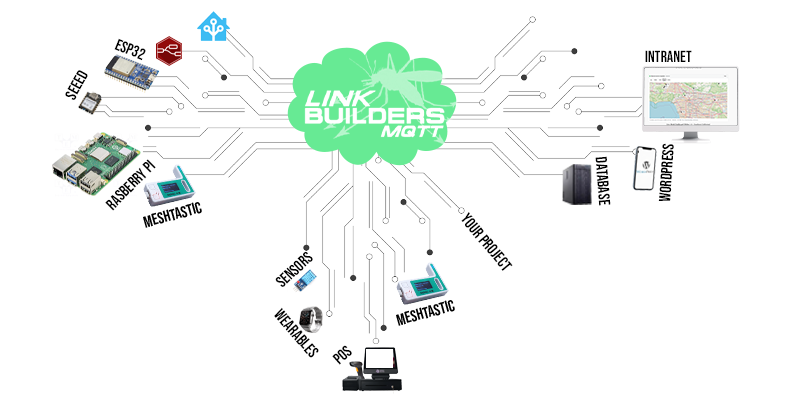
A stable WordPress + MQTT setup usually looks like this:
- Devices or services publish to MQTT
- A managed broker handles TLS and WebSockets
- WordPress ingests data server-side
- Public pages render cached snapshots
- Admin users optionally see live streams
This architecture:
- Scales well
- Keeps credentials secure
- Works with WordPress caching
- Avoids browser-side chaos
When MQTT Is the Wrong Tool
MQTT is powerful, but it’s not universal.
It may be overkill if:
- Your data updates infrequently
- REST APIs meet your needs
- Real-time isn’t actually required
Don’t use MQTT because it’s trendy; use it because it fits the problem.
Final Thoughts
MQTT unlocks real-time capabilities that WordPress was never designed to handle; but it does so cleanly when implemented correctly.
The key is understanding:
- Where MQTT belongs
- Where it doesn’t
- And how much infrastructure you want to own
If you treat MQTT as part of your system design; not an afterthought; it becomes one of the most powerful tools in a WordPress developer’s stack.

Web developer, field recorder, electronics experimentalist.
Michael Winchester Design | (562)283-5688


